
Announcement
Starting June 10, 2010, Full Hiatus (Support, Upgrades)
** ON HIATUS (on a break) ** NOT DEAD **
Starting Thursday, June 10, 2010 …
Unavailable:
- Upgrade purchases (addons & themes) will become unavailable.
- Email & forum support for any new issues related to base Store Locator unavailable (please view: Documentation | Answers already in the forum)
Tentative Plans:
- Updates that have been in the works for several months (bugfixes, enhancements, additions/updates of translations, website)
- Will attempt to address any outstanding support issues
… Currently, there isn’t a definite timeline for this hiatus, however, as of now, it will be until at least early 2013. Thank you once again for using the Store Locator plugin!
** ON HIATUS (on a break) ** NOT DEAD **
Temporary Customization Request Hiatus After Friday, April 30, 2010
Hello All … A Quick Announcement:
Increase can be good
Temporarily, won’t be taking any new Store Locator customization requests after next Friday, April 30, 2010. Need to shift focus back to product & business development for the Store Locator in order to better serve more of you.
Since the Start of 2010
The first four months of 2010 have been extremely busy, thus the lack of blog updates since December 2009. There has been an approximate 400% – 500% increase in customization requests this year — a very humbling fact, because it shows that an increased number of you have found the Store Locator plugin to be useful enough to use on your websites and to recommend to your respective web clients.
An Important Note to Users
Needless to say, the plugin is not perfect, nor is there any claim or warranty that it is. There is always room for improvement. Suggestions on improvements have been noted. Also, for those of you that have purchased upgrades — thank you. Providing added value and and continuing to improve the upgrading process will be a few focuses moving forward.
For those who plan to purchase upgrades, please make sure to read through important sections of this site before purchasing products, such as the Upgrade Purchase Tips, Terms, and the Documentation. This cannot be stressed enough. These sections are there to serve you, and it will always be in your best interest as an well-informed user not to overlook them.
Moving Forward
Still planning next stages of this plugin. The development roadmap is a long one, in which we all may be closer to the start than the end — but plans do always evolve, however. It just goes to show how much work goes into developing a plugin such as the Store Locator. Hope it continues to serve everyone well. More updates to come.
All Gray / Blank Map Issues Should Now Be Fixed! + Enjoy the Holiday Season
Gray Maps Should Be A Thing of the Past
Made many fixes in version 1.2.33 of the Store Locator plugin for the many of you that have been experiencing trouble with gray / blank maps.
It should be 100% fixed now, if you find otherwise, say so here in the comments! Otherwise enjoy. More fixes coming, hoping to speed up development during the Holiday Season.
Go to Store Locator Download Page
Translations
Lastly, the translation template has been updated. Please provide a translation if you create one for your plugin. Here’s the template:
[download#13#nohits]
Leaving you with this! …
Store Locator 1.2.28.3 is Required for WordPress 2.8.1 and Above
Quick Note: Please update to at least Store Locator 1.2.28.3 if you decide to use WordPress 2.8.1 and above.
Due to security tightening measures implemented by the WordPress development team, tweaks were made to the Store Locator plugin, and you will reap those security benefits with version 1.2.28.3.
… More updates in the next few days. All your enthusiasm for this plugin is impressive, working hard towards the next phase, including Version 1.3 and beyond …
Documentation Wiki is Now Live! + New Countries Added in v.1.2.28
Version 1.3 has the makings of something special. But, with more features, documentation always helps everyone to make full use of it.
Plus, the Wiki format (just like Wikipedia) allows for you to easily contribute your findings, fixes, or hacks to the Store Locator plugin — no login necessary.
Check Out & Contribute to the Store Locator Documentation Wiki:
Many of you have shown some amazing skill in your code contributions through email and in the forum. Please don’t hesitate now to contribute to the newly created Documentation Wiki here:
http://docs.viadat.com
Below are the Updated Countries in v1.2.28:
* Austria
* Japan
* Taiwan
Added Countries (as of v1.2.28):
* China
* India
* Hong Kong
* Kenya
* Liechtenstein
* Malaysia
* South Korea
* Thailand
Removed Country (as of v.1.2.28):
* Bosnia and Herzegovina (doesn’t appear to be working anymore)
Google Maps Store Locator for WordPress Version 1.2.xx – “The Flight of the Bugs”
Greetings everyone. As always, your feedback has been more than appreciated. Version 1.2 has been dubbed “The Flight of the Bugs” because through each minor revision, we are getting closer and closer kicking out all the major bugs in this plugin.

You may not realize it, but the WordPress Store Locator is very far from it final stage. The next major versions will contain more features, and should allow you do much more.
For now, what we need from you: More complaints, more bug reports — If any little thing doesn’t work properly or something “bugs” you (pun intended), don’t hesitate to respond to this post.
Also, don’t forget, we still would love to have any translation that you may have completed for yourself, even if it’s not complete. Something is better than nothing. For more information on doing a translation, please go here
Store Locator Translation Files Wanted (You Might Just Get Something Nice in Return)
Store Locator Translations are needed to better localize our WordPress Store Locator plugin.
If you have translated it into a different language, make sure to email the PO translation file to info [at] viadat.com … You might even get something nice in return … How does a free Store Locator upgrade sound?
If you would like to translate, but don’t know how, here are some quick steps:
1) Download the Most Recent Translation Template:
[download#13#nohits]
2) Download the program PoEdit:
http://www.poedit.net/download.php
3) Install PoEdit on your computer
4) Open the Store Locator Translation Template using PoEdit
*PoEdit allows you to translate individual phrases in the code, thus you should translate each phrase that appears. Once you’ve finished, and you save the PO translation file, an MO file (Machine-readable version of your human-readable PO file) will be generated. Email both files to us, and tell us what language it is. And you’re finished — simple, correct?
Countries Needed for Language Translation:
* Austria (German)
* Australia (English)
* Belgium (Dutch, French, German)
* Brazil (Portuguese)
* Canada (English, French)
* Switzerland (German, French, Italian)
* Czech Republic
* Germany
* Denmark
* Spain
* Finland
* Italy
* Japan
* Netherlands
* Norway
* New Zealand (English)
* Poland
* Russia
* Sweden
* Taiwan (Chinese [traditional])
* United Kingdom (English)
* United States (English)
* China (Chinese [simplified])
* India
* Hong Kong (English, Chinese [simplified], Chinese [traditional])
* Liechtenstein (German)
* South Korea
* Argentina (Spanish)
* Chile (Spanish)
* Mexico (Spanish)
* Portugal
* Singapore (English, Malay, Chinese [simplified], Tamil)
Google Maps Store Locator for WordPress v1.2 is out + We have a new address on the WordPress Plugin Directory
Go to Download Page | Go to Store Locator WordPress Plugin Page
Changelog:
New Features:
1) Locations show up on the map by default
2) Added option to show and drop-down of all cities that user can search
3) Updated Store Locator Graphical User interface
4) Added option to show or hide Credits / Google Terms bar below map
5) Added ‘Website’ link next to ‘Directions’ Link for addresses that have their URLs properly specified beginning w/’http://’
Bugfixes:
1) Header error messages under “Manage Locations” (formerly “View Locations”) tab resolved
2) Update error for individual addresses under “Manage Locations” resolved
3) Bubble conformity to images and text for each location resolved
4) Issue of not seeing starting location icon for some searches resolved
Continually working to bring you new and better features! Stay tuned.

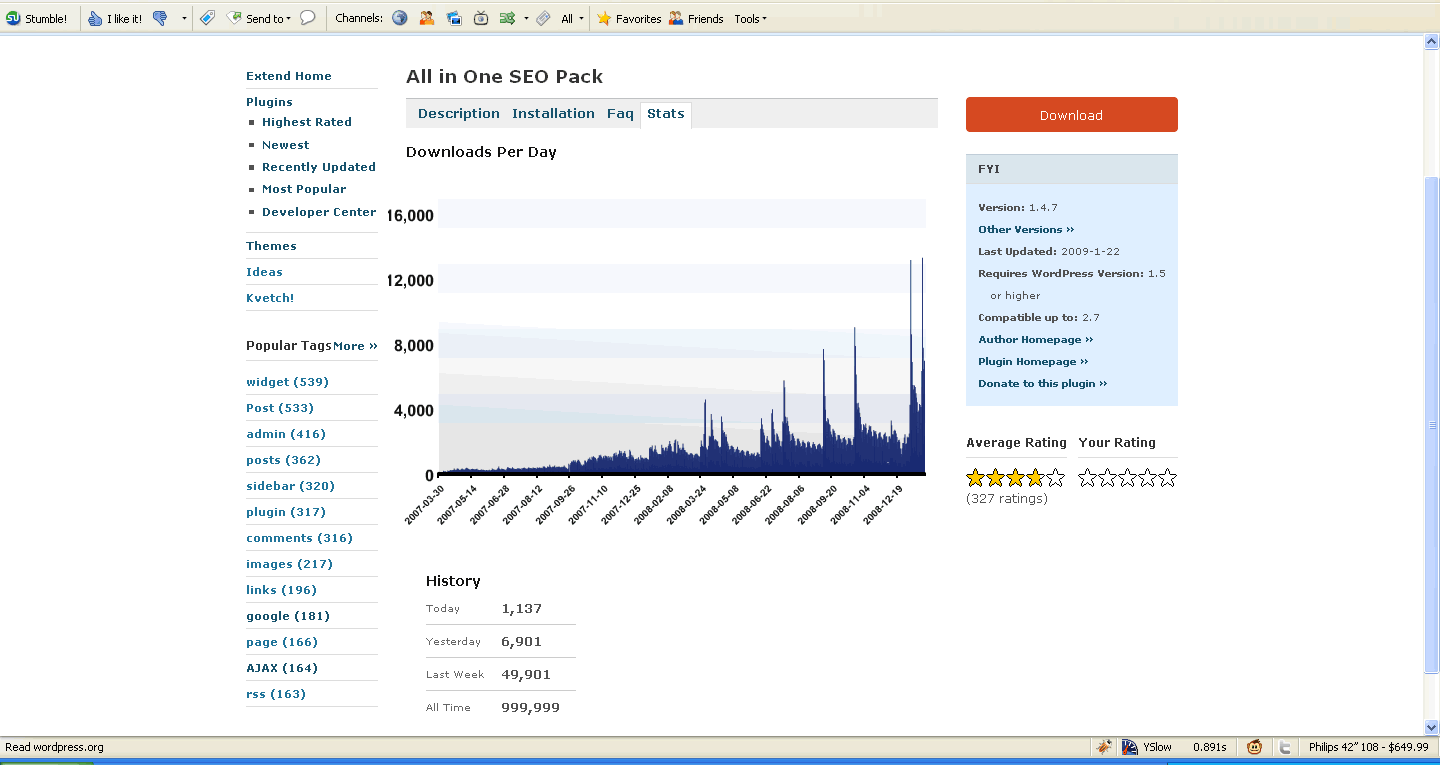
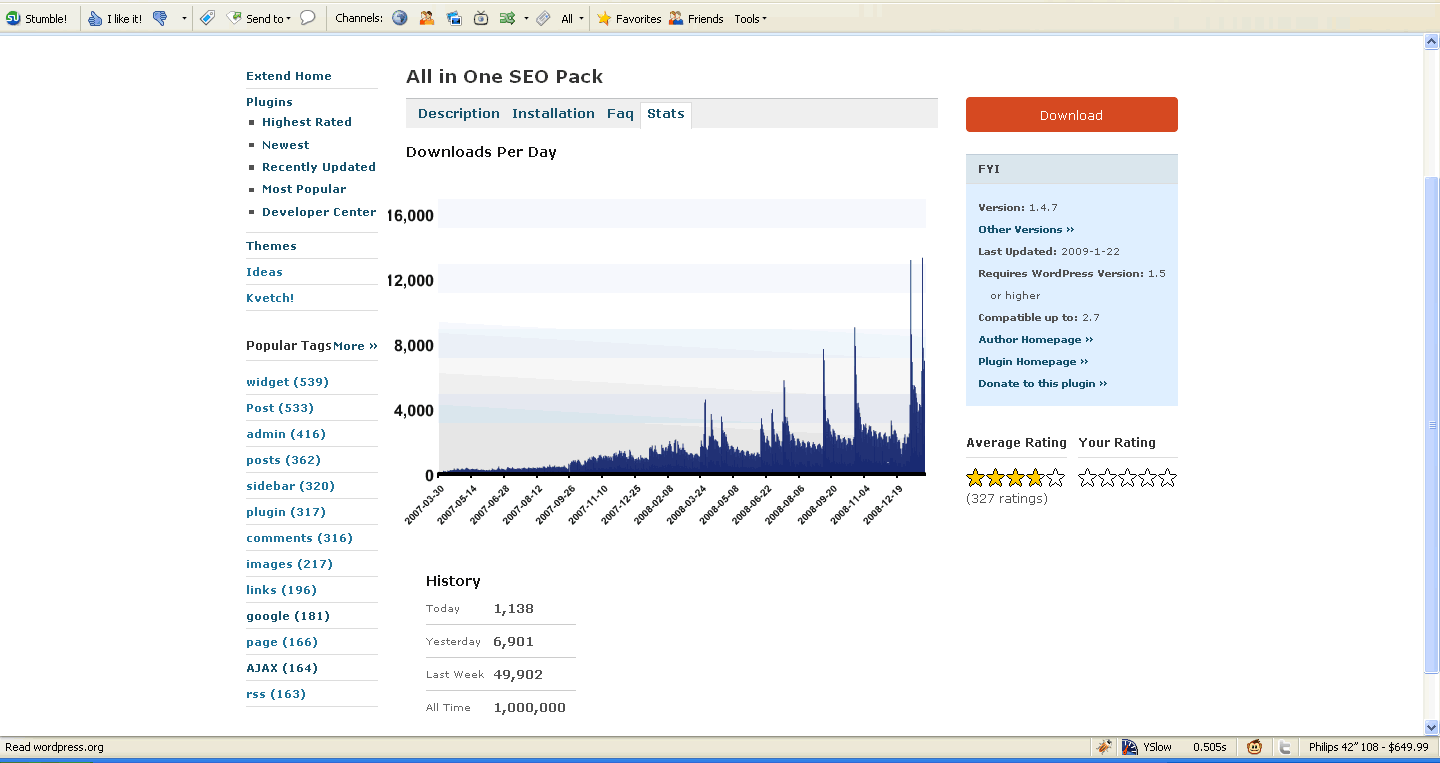
Congratulations: All-in-One-SEO Pack Becomes First Plugin to Reach 1,000,000 (1 Million) Downloads on the WordPress Plugin Directory
While working on our next release, we noticed that the All-in-One-SEO Pack (http://wordpress.org/extend/plugins/all-in-one-seo-pack/) was fast approaching the 1 Million (1,000,000) download mark on the WordPress plugin directory.
I enjoy watching the clock strike midnight on New Year’s Eve every year, so I decided, “Why not track this and make sure to capture the transition from 999,999 to 1,000,000 for anyone who might be interested in seeing it?” Fortunately, I was able to do so (I feared it might skip from 999,998 to 1,000,001 as I refreshed the page, but fortunately, it didn’t)
A big congratulations is in order and well deserved by the the creators of this plugin (http://www.semperfiwebdesign.com/). We have certainly this plugin it on a number of our WordPress installations, and agree that it deserves the amount of downloads it has received.
Screenshots Below
(Click to enlarged images – Time of screenshots: 9:53pm & 9:54pm Central Standard Time):
(View their blog post about it)
Search
Cart
- Your cart is empty.