
Posted On: wordpress store locator plugin
Temporary Customization Request Hiatus After Friday, April 30, 2010
Hello All … A Quick Announcement:
Increase can be good
Temporarily, won’t be taking any new Store Locator customization requests after next Friday, April 30, 2010. Need to shift focus back to product & business development for the Store Locator in order to better serve more of you.
Since the Start of 2010
The first four months of 2010 have been extremely busy, thus the lack of blog updates since December 2009. There has been an approximate 400% – 500% increase in customization requests this year — a very humbling fact, because it shows that an increased number of you have found the Store Locator plugin to be useful enough to use on your websites and to recommend to your respective web clients.
An Important Note to Users
Needless to say, the plugin is not perfect, nor is there any claim or warranty that it is. There is always room for improvement. Suggestions on improvements have been noted. Also, for those of you that have purchased upgrades — thank you. Providing added value and and continuing to improve the upgrading process will be a few focuses moving forward.
For those who plan to purchase upgrades, please make sure to read through important sections of this site before purchasing products, such as the Upgrade Purchase Tips, Terms, and the Documentation. This cannot be stressed enough. These sections are there to serve you, and it will always be in your best interest as an well-informed user not to overlook them.
Moving Forward
Still planning next stages of this plugin. The development roadmap is a long one, in which we all may be closer to the start than the end — but plans do always evolve, however. It just goes to show how much work goes into developing a plugin such as the Store Locator. Hope it continues to serve everyone well. More updates to come.
Store Locator 1.2.28.3 is Required for WordPress 2.8.1 and Above
Quick Note: Please update to at least Store Locator 1.2.28.3 if you decide to use WordPress 2.8.1 and above.
Due to security tightening measures implemented by the WordPress development team, tweaks were made to the Store Locator plugin, and you will reap those security benefits with version 1.2.28.3.
… More updates in the next few days. All your enthusiasm for this plugin is impressive, working hard towards the next phase, including Version 1.3 and beyond …
Documentation Wiki is Now Live! + New Countries Added in v.1.2.28
Version 1.3 has the makings of something special. But, with more features, documentation always helps everyone to make full use of it.
Plus, the Wiki format (just like Wikipedia) allows for you to easily contribute your findings, fixes, or hacks to the Store Locator plugin — no login necessary.
Check Out & Contribute to the Store Locator Documentation Wiki:
Many of you have shown some amazing skill in your code contributions through email and in the forum. Please don’t hesitate now to contribute to the newly created Documentation Wiki here:
http://docs.viadat.com
Below are the Updated Countries in v1.2.28:
* Austria
* Japan
* Taiwan
Added Countries (as of v1.2.28):
* China
* India
* Hong Kong
* Kenya
* Liechtenstein
* Malaysia
* South Korea
* Thailand
Removed Country (as of v.1.2.28):
* Bosnia and Herzegovina (doesn’t appear to be working anymore)
New Things to See Since Version 1.2.23 + Version 1.3 is Approaching
If you haven’t updated up to Version 1.2.23 of the Google Maps Store Locator Plugin, definitely check it out! You will notice two major interface changes: One major change on the administration panel, and one major change to the mapping interface
Administration Panel
The “Map Designer” page has been revamped to be a little cleaner to allow for more logical management of the look and feel of your store locator map.
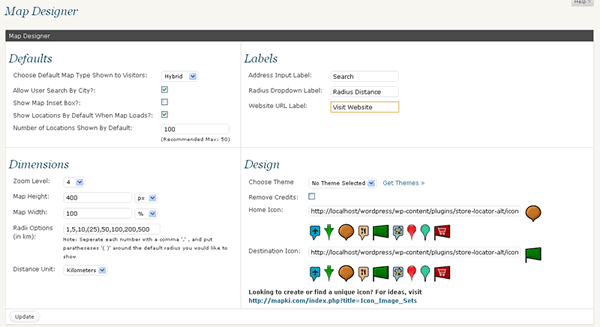
Map Interface
The Map Interface now uses the new Zoom and Pan tools provided by Google, which gives your store locators a much sleeker appeal.
Even maps deserve a makeover every now and then
Version 1.3
Version 1.3 is already being worked on, and I must say, I’m liking the new features. Plans are to have it ready no later then end of this month, June 2009.
Any desires, requests for features to be included? Would love to hear them.
Store Locator Translation Files Wanted (You Might Just Get Something Nice in Return)
Store Locator Translations are needed to better localize our WordPress Store Locator plugin.
If you have translated it into a different language, make sure to email the PO translation file to info [at] viadat.com … You might even get something nice in return … How does a free Store Locator upgrade sound?
If you would like to translate, but don’t know how, here are some quick steps:
1) Download the Most Recent Translation Template:
[download#13#nohits]
2) Download the program PoEdit:
http://www.poedit.net/download.php
3) Install PoEdit on your computer
4) Open the Store Locator Translation Template using PoEdit
*PoEdit allows you to translate individual phrases in the code, thus you should translate each phrase that appears. Once you’ve finished, and you save the PO translation file, an MO file (Machine-readable version of your human-readable PO file) will be generated. Email both files to us, and tell us what language it is. And you’re finished — simple, correct?
Countries Needed for Language Translation:
* Austria (German)
* Australia (English)
* Belgium (Dutch, French, German)
* Brazil (Portuguese)
* Canada (English, French)
* Switzerland (German, French, Italian)
* Czech Republic
* Germany
* Denmark
* Spain
* Finland
* Italy
* Japan
* Netherlands
* Norway
* New Zealand (English)
* Poland
* Russia
* Sweden
* Taiwan (Chinese [traditional])
* United Kingdom (English)
* United States (English)
* China (Chinese [simplified])
* India
* Hong Kong (English, Chinese [simplified], Chinese [traditional])
* Liechtenstein (German)
* South Korea
* Argentina (Spanish)
* Chile (Spanish)
* Mexico (Spanish)
* Portugal
* Singapore (English, Malay, Chinese [simplified], Tamil)
Google Maps Store Locator Plugin for WordPress
We’ve released Version 1.0, which can be found here: http://www.viadat.com/2008/12/wordpress-store-locator-plugin-v10-is-here/
To stay updated on our latest releases, go here: http://www.viadat.com/store-locator/
We’re currently developing a Store Locator Plugin for the popular WordPress content management system.
Features
This plugin will allow for individuals & companies using WordPress to easily display a store locator of their stores, products, or other locations of interest to their customers and online visitors.
Launch
Development is expected to be completed by late November 2008. Launch will happen shortly thereafter.
Stay Updated
Subscribe to our RSS Feed in order to keep updated on this launch.
Interested Yet? Questions? Let Us Know
Feature requests, questions, and any other commentary is encouraged below!
Search
Cart
- Your cart is empty.